
Website Optimization Tips to Boost Speed and Performance
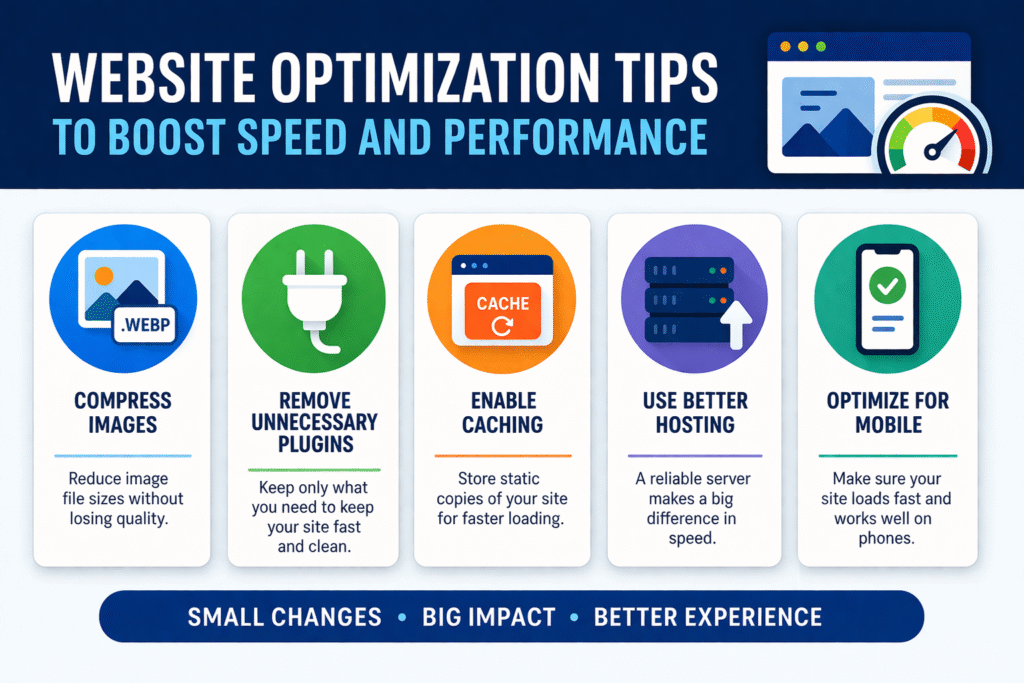
Most websites don’t feel slow at first. They load, they work, and everything seems fine.
But over time, something changes. Pages take a bit longer to open. Clicking around doesn’t feel as smooth. And slowly, without noticing, people start leaving faster than before. That’s usually when you realize — something needs improvement.
Table of Contents
- Why website optimization matters
- Common issues that affect performance
- Practical optimization tips
- Real-life example
- Final thoughts
Why Website Optimization Matters
A website is often the first impression of your business. If it loads quickly and feels smooth, people stay. If it feels slow or confusing, they leave.
It’s that simple.
Optimization isn’t just about speed. It’s about making the experience easier for the person using your website.
What Usually Slows a Website Down
Before fixing anything, it helps to understand what’s causing the problem. Most of the time, it’s not one big issue. It’s a mix of small things.
Too Many Heavy Images
Images improve design, but large files slow everything down.
Many websites use high-quality images without compressing them, which affects loading speed.
Extra Plugins and Features
Adding features is easy. But every extra plugin adds load time. Some websites end up using tools they don’t really need.
Poor Hosting Setup
Hosting plays a bigger role than most people expect. If the server is slow, your website will feel slow no matter how well it’s designed.
No Regular Updates
Websites that are not maintained slowly lose performance. Updates and optimizations are often ignored after launch.
Mobile Performance Issues
Most visitors come from mobile devices. If your website isn’t optimized for mobile, it affects user experience directly.
Simple Website Optimization Tips That Actually Help
You don’t need to do everything at once.
Start with the basics.
✔ Compress Images Before Uploading
Use tools like TinyPNG or WebP format.
You’ll keep quality while reducing size.
✔ Remove What You Don’t Use
Go through your plugins and features.
If something isn’t necessary, remove it.
✔ Enable Caching
Caching helps your website load faster for repeat visitors.
It’s a simple change with noticeable impact.
✔ Choose Better Hosting
If your website has grown, your hosting should match it.
Upgrading hosting often improves speed instantly.
✔ Focus on Mobile Optimization
Check how your website performs on phones.
Fix layout issues and loading delays.
A Small Example That Makes a Big Difference
A business website looked completely fine. Design was clean, content was clear. But it felt slow. After checking, the main issues were heavy images and unnecessary plugins. Nothing major. After fixing just those two things, the website became noticeably faster. Visitors stayed longer. Engagement improved. No redesign. Just small improvements.
When It’s Better to Get Expert Help
Sometimes the problem isn’t obvious. You might fix a few things, but the performance still doesn’t improve much.
That’s when a proper review helps.
Not to rebuild everything — just to understand what’s actually causing the slowdown. Teams like APPENDO CONSULTING AND SERVICES usually focus on practical optimization instead of overcomplicating things.
If you want to explore:
👉 https://www.acsindia.in
Final Thoughts
Website optimization isn’t about making everything perfect. It’s about removing what slows things down. Small changes can have a big impact. And the sooner you fix them, the better your website performs — not just technically, but for real users.